How to Get Your Radio Station Found on Google: A Practical Guide to Radio Station SEO
When someone types your station’s name into Google, the first thing they should see is a page where they can press play. That is the goal of radio station SEO for every internet radio station, and it is more reachable than you might think. Most potential listeners start with a search engine, even when they already know a station’s name. If your radio station cannot be found on Google, those listeners hear silence instead of your broadcast.
This guide is for you if you run a small station: community, church, school, nonprofit, diaspora, or indie. Most stations like yours operate with volunteer teams and often have no website of their own. That is fine. Every Zeno.FM station already has a microsite that Google can index, and this article shows you how to make that page do the heavy lifting. SEO for radio stations bridges the gap between audio broadcasts and text-based search; once you understand a few plain steps, you can help your station show up where listeners are looking.
How Google Finds and Ranks Your Radio Station Page
Think of Google as someone who first hears about you, then writes down your details, then decides who to mention when a friend asks for a recommendation. Those three steps have names: discover, index, rank.
Google discovers most new pages through links. When your microsite URL appears on a social media profile, in a radio directory listing, or on a partner organization’s site, Google follows that link and finds your page. You do not need to “submit” anything; links are the trail Google follows.
Once Google finds your page, it stores information like your station name, description, city, and language. That storage step is indexing. It can take a while, and the timing is entirely Google’s decision. You cannot speed it up by refreshing or resubmitting.
Ranking is where Google decides the order of search results. The top three organic results earn 54.4% of all clicks, so position matters. Google prioritizes clear, well-structured, trustworthy content. There is no trick to jump the queue. You improve your rank through accuracy, consistency, and useful links pointing to your page. Radio SEO is the practice of improving what Google sees on your page and around the web so it matches the right queries; search engine optimization for a radio station is about clarity, not complexity.
Meet Your Zeno.FM Microsite: Your Station’s Home on Google
Every Zeno.FM station has a microsite at a URL like zeno.fm/radio/your-page-url/ that search engines can index. For many stations without a separate site, this microsite is effectively your radio station website in Google’s eyes.
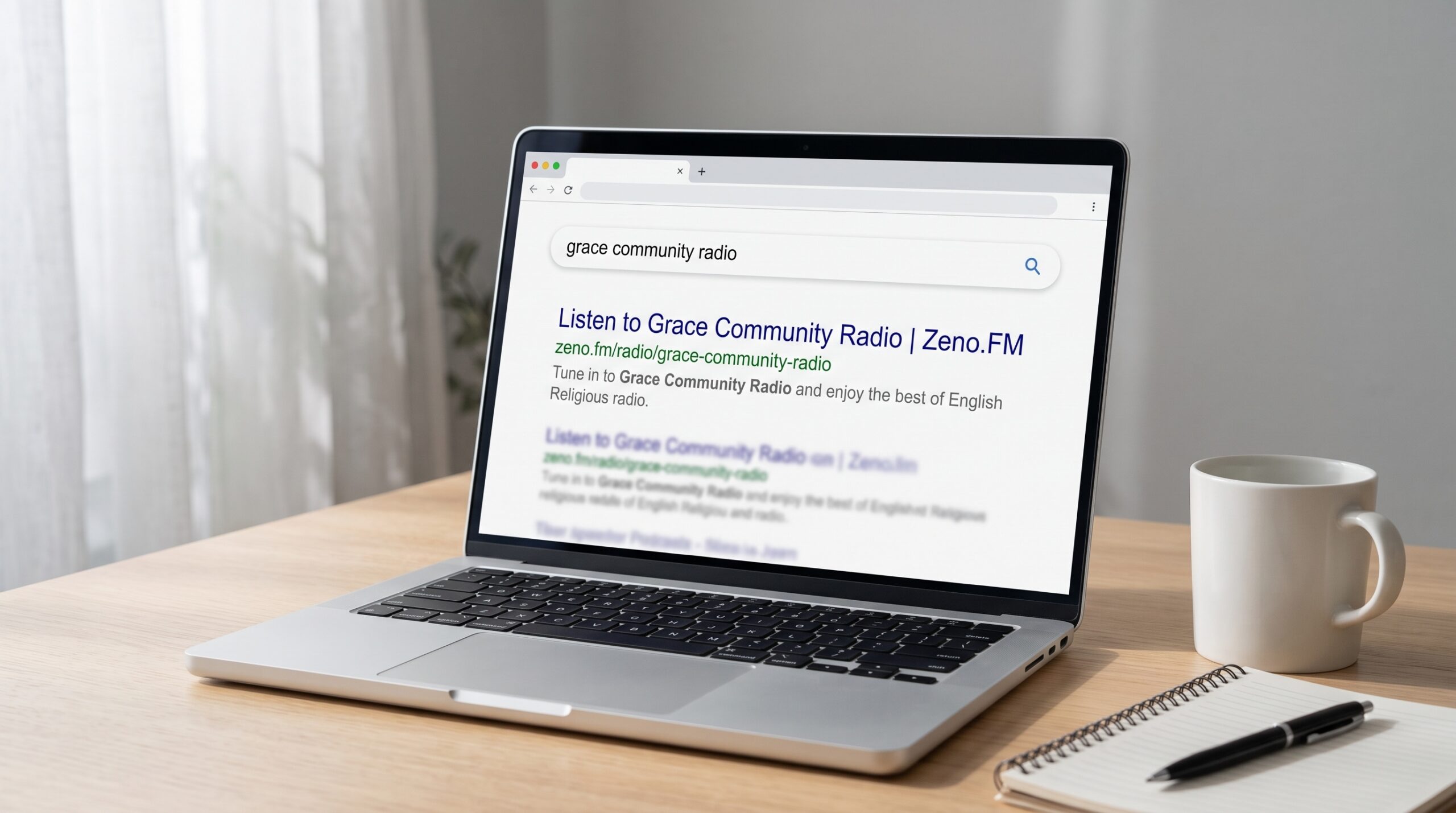
The page title Google shows is built directly from your station name: “Listen to [Station Name] | Zeno.FM.” That means your radio station name is literally the headline listeners see in search results. The short summary underneath is generated automatically from the station name, language, and content type you set in your profile. Accurate profile fields produce an accurate search snippet; wrong fields produce a confusing one.
Behind the scenes, the microsite includes structured data: extra information inside the page that tells search engines “this is a radio station” along with your name, description, and logo. Structured data improves visibility in search results and helps search engines understand the context of a station’s content. Utilizing schema markup like this increases the chances of appearing in rich results on Google Search.
To edit your microsite, open Zeno Tools, click on Zeno.FM, select your station, then update sections like Page Settings, Station Profile, Microsite Images, Station Website, and Social Media. After each group of changes, click Save.
Radio Station SEO on Zeno.FM: Microsite Optimization Checklist
If you do nothing else after reading this guide, complete the checklist below. These fields shape what Google shows when someone searches your station name.
- Use a real station name. If you leave a placeholder or URL as your name, Google displays something like “Listen to www.mystation.com | Zeno.FM,” which confuses users and looks unprofessional. Pick a human-readable name that listeners will recognize and remember.
- Choose your page URL early and keep it short. The page URL in Page Settings should closely match your station name, with no random numbers or dates. If you ever change it, update the link everywhere you have already shared it: social bios, WhatsApp messages, flyers and partner sites.
- Set country, city, content type, and language accurately. These Station Profile fields shape how your snippet looks on Google and help with local SEO and language-based searches. If your station broadcasts in Spanish but the language field says English, your snippet misleads everyone. Local searches like “radio station near me” depend on these details. Local relevance is a strong ranking signal for radio stations.
- Write a clear description. Your description appears on your microsite right below your station name, content type, country and language, and it is part of the information search engines read about your station. Write one to three sentences covering your genre, city or region, community identity, and what makes you different. Avoid repeating “internet radio station” or your city name over and over; keyword stuffing makes text harder to read and can backfire.
- Upload a clear, square logo. Use a square, high-resolution image, and check it after you save: your name or symbol should still be readable when the logo appears as a small icon, without being cropped or stretched.
- Fill in Station Website and Social Media. If you have an external site, enter its URL. Add your social media profiles so Google sees consistent information across the web.
- Post Announcements. A static site gives Google little to work with. Fresh content helps search engines find and rank your site, so post short updates like “Live Sunday service every week at 10:00” to keep the page looking active. Fresh content increases the chances of ranking higher in search results.
- Complete Listener Donations if you accept them. This field helps visitors trust your page and stay longer, which supports engagement.
Step-by-Step: Editing Your Zeno.FM Microsite Fields
Start by opening Zeno Tools and clicking on Zeno.FM, then select the correct station from your list. Visit Page Settings first to confirm that your landing page URL is short, clean, and matches your station name.
Next, open Station Profile and set your station name, content type, country, city, and language. Each of these fields feeds directly into how Google displays your station in search results.
Then add or update your one-to-three-sentence description and check how it looks on your live microsite. Then check Microsite Images to upload or update your square logo and optional background image.
Open the Station Website section and enter your website URL if you have one. In Social Media, add each profile link so listeners and search engines can verify your identity across platforms.
Finally, add an Announcement with a current schedule or upcoming event and click Save. Each saved change gives Google clearer information the next time it crawls your page, even though Zeno.FM does not control when that happens.
Patience, Consistency and Checking Whether You’re Indexed
New internet radio stations often feel anxious when Google does not show their page right away. That is normal. Zeno.FM does not control when Google crawls or updates the microsite, and it can take a while before a brand-new page appears in search results.
To check progress, search Google for your exact station name in quotes, like “Your Station Name.” Then try searching for “zeno.fm Your Station Name” to see whether Google has indexed that specific page. You can also use Google Search Console as a free tool if you manage a separate website and want to track queries and organic traffic there.
Avoid renaming your station or changing the page URL repeatedly. Each big change resets parts of what Google has learned about you and can fragment the trust you have built. Building backlinks takes time and consistent effort; the same is true for all of radio station SEO.
While you wait, keep your station name, city, language, and links consistent everywhere: social profiles, WhatsApp groups, printed flyers, church bulletins. Measuring SEO success should focus on listener growth rather than just rankings. If more people are pressing play, the work is paying off.
Beyond the Microsite: Helping Google Discover and Trust Your Station
Everything around your station quietly supports radio station SEO. Off-site signals tell Google that your station is real, active, and trusted by a community.
Use the exact same station name everywhere: social profiles, messaging groups, printed flyers, community posters. Stations with consistent NAP (name, address, phone) details rank better locally, and even stations without a physical address benefit from name consistency. Inconsistent spelling splits your presence in Google’s mind.
Link to your Zeno.FM microsite from social bios and posts. Social media can help generate backlinks for radio stations, and links from reputable sites signal authority to Google. For a deeper approach, build a social media plan around regular sharing. Whenever you mention the station in WhatsApp broadcasts, include the microsite link so recipients can share and click.
If you have or plan to build a full website, link both ways: site to microsite and microsite to site. A clear site title and meta description help Google connect the two.
Google Business Profile optimization is crucial for local SEO, but only claim one if your station has a real physical place listeners can visit, like a studio, church, or school. Claiming your Google Business Profile boosts local visibility. Fill in your name, address, phone, category, and hours; add photos; verify. A well-optimized Google Business Profile boosts local visibility quickly.
Earn mentions and links from local partners. A church directory page linking to your station, a school bulletin listing your broadcast schedule, or a local news site writing about your community programming all help. Local backlinks from partnerships enhance a station’s authority and visibility. Quality backlinks improve your chances of ranking highly, and local content is crucial for radio stations to rank well. Search engines favor hyper-local content over generic content, so creating a content strategy around local events and stories builds listener loyalty. Publishing local content attracts engaged listeners, and regular updates on local events can help keep the station relevant in searches. Radio stations must capture high-intent listeners searching for local content. Local SEO is crucial for stations serving specific geographic areas.
Being listed correctly in generic radio directories can also help discovery. You can also browse Zeno.FM Explore to see how other stations present themselves. Once the basics are in place, read about how to grow your online radio station and reach your first 1,000 listeners.
If You Also Run a Website: Simple SEO Basics That Help Your Station
This section is optional reading for stations that already have a website or plan to build one. Your Zeno.FM microsite remains the focus, but a website gives you more pages for Google to index and more ways to reach a global audience.
Clear, descriptive page titles and meta descriptions assist in attracting clicks. A good homepage title might be “Gospel Radio for [City] – [Station Name].” A show page could read “Sunday Service Live – [Church Name] Radio.” Search engines and users both benefit from readable URLs and a simple navigation structure: Home, Listen Live, Schedule, Shows, About, Contact. Prominent placement of “Listen Live” buttons improves accessibility for users. Link back to the Zeno.FM stream or player so visitors can press play immediately.
Mobile devices account for 52% of web traffic, so mobile-friendly websites reduce bounce rates and enhance listener engagement. A website’s technical performance affects its overall SEO effectiveness; pay attention to page speed, compress images, and check core web vitals. Search engines prioritize fast, well-structured websites for ranking.
Dedicated pages for shows and hosts help improve SEO performance. Stations with pages for shows and episodes have more ranking opportunities because each page can match different queries. Audio programs should be turned into text content for better SEO; transcribing audio content aids search engines in indexing relevant information. Broadcasts should be documented with transcripts to leverage their full SEO potential. Using FAQs on station websites can improve user engagement and SEO. Regular content about events, news, podcasts, and community stories gives search engines more unique content to match with local searches. Structured data on a separate website also helps search engines understand your pages as radio content, though the details of implementation go beyond this guide.
Common Radio Station SEO Mistakes to Avoid
A few common errors can undo your hard work. Here is a quick reference list:
- Test or placeholder names. A station called “My Test Station” shows up in Google as “Listen to My Test Station | Zeno.FM.” Most stations forget to change this after setup.
- Station name that looks like a URL. Naming your station “www.mystation.com” produces a confusing headline in search results and tells listeners nothing about your sound or community.
- Empty description. Without a description, Google generates a vague snippet that gives no one a reason to click.
- Wrong language or country. If your station broadcasts in French but the profile says English, the snippet misleads users and you may appear in irrelevant local directories.
- Missing, blurry, or stretched logo. The logo is the first visual sign of your station online. Low-quality images weaken trust before anyone presses play.
- Frequent name or URL changes. Each change resets parts of what Google has learned. Consistency over time is a quiet but powerful part of good SEO.
- Keyword stuffing. Repeating “internet radio station” and your city name in every sentence makes your description unreadable. Write for listeners, not for a search engine keyword counter.
- Different names on different platforms. If your microsite says “Grace Community Radio,” your Facebook page says “GCR FM,” and your flyer says “Grace Radio,” you are splitting your visibility across three identities.
- Expecting instant results. No one can control Google’s rankings. SEO is a slow build. Any promise of “rank number one overnight” is empty.
Questions Small Stations Often Ask About Being Found on Google
Do I need a full website for my internet radio station to show up on Google? Your Zeno.FM microsite is often enough to appear when someone searches your station name. It includes your name, description, logo, language, and city. A full website helps if you want pages for shows, events, sponsors, or deeper content, but it is not required for basic visibility.
How long before my new station appears on Google? Timing is up to Google. It can take a while for a new page to be indexed. While you wait, complete every field on your microsite, post an announcement, and get a few links pointing to your page from social profiles or partner sites.
What is structured data and why does it matter? Structured data is behind-the-scenes information on the microsite that tells Google “this is a radio station” with a name, description, and logo. It helps produce more accurate search results and can lead to rich results that stand out on the page.
Can I improve local SEO for an internet radio station? Yes. Set your city, country, and language correctly. Earn mentions from local community organizations, churches, schools, and local media. If you have a physical location, add a Google Business Profile. Each local reference helps Google connect your station to a specific city.
How do I know people find me through Google? If you run a website, Google Search Console and Google Analytics show which queries bring traffic and how many users click. Even without those tools, you can track listener growth and notice whether new listeners mention finding you through search. Many stations measure success by the number of people pressing play each week.
Putting It All Together: Your Next Steps for Radio Station SEO
Radio station SEO starts with your Zeno.FM microsite, the main page Google can show when someone searches for your station. Choose a clear, consistent station name. Complete every field: description, city, language, content type, logo, and social links. Link to that page from your social profiles, WhatsApp messages, partner sites, and any channel where your audience gathers.
Ready to get started? Set up your station’s microsite today if you have not already, or go back and fill in the fields you skipped. Being found on Google takes patience, but every accurate field, every consistent mention of your station name, and every link from a trusted community partner helps search engines and new listeners recognize your station as the right place to press play.
October 20, 2026