How to Plan a 24/7 Radio Programming Schedule
Are you a new or experienced radio station manager looking to keep your station running smoothly around the clock? This guide is designed specifically for you. Here, you’ll find strategies, templates, and automation tips for building a 24/7 radio programming schedule that keeps your content fresh, your listeners engaged, and your station’s brand strong. Starting a radio station is easy; keeping a 24/7 radio programming schedule running is the real challenge. Without a plan, you’ll find yourself playing the same songs on loop or, worse, facing dead air.
In 2026, the key to successful radio isn’t just “shuffling” your library. It’s about matching your programming with listener routines—a strategy known as Dayparting. This guide covers how to use dayparting, the clock method, and automation to create a seamless 24/7 schedule.
A well-structured 24/7 schedule provides:
-
Improved content flow, ensuring smooth transitions and a professional sound.
-
Loyal listener habits, as consistent scheduling builds trust and routine.
-
A clear station voice, helping define your brand and stand out.
-
Global reach, allowing you to serve audiences across different time zones.
-
The ability to broadcast 24/7 without live staff, making your station cost-effective and avoiding dead air.
Let’s dive into the essential strategies for building your own 24/7 radio programming schedule.
Understand the Dayparting Strategy
What is Dayparting?
Dayparting is the practice of matching programming with listener routines. By dividing the broadcast day into segments, or “dayparts,” and understanding the listening context behind each one, you can tailor your content to fit the mood, needs, and habits of your audience at different times.
|
Daypart |
Time |
Programming Focus |
|---|---|---|
|
Morning Drive / Breakfast Show |
6 AM – 10 AM |
High energy, news, weather, and upbeat tracks to start the day. |
|
The Mid-Day Workday |
10 AM – 3 PM |
“Companion” audio. Fewer interruptions, longer music sets, and “flow” music for focus. |
|
The Drive Home |
3 PM – 7 PM |
High energy again. Personality-driven talk, trending topics, and hit music for commuters. |
|
Late Night |
10 PM – 2 AM |
Chill-out sets, deep dives, or automated ambient music. |
|
By understanding your dayparts, you can ensure your station always delivers the right content at the right time, building loyal listener habits and a strong station identity. Thoughtful programming also encourages listeners to discover new shows across the day. Evening slots typically run from 7 p.m. to midnight, which helps bridge the gap between Drive Home and Late Night. |
|
|
Once you understand your dayparts, you can structure each hour using the clock method.
Use the Clock Method
What is the Clock Method?
The clock method is a way of structuring each hour’s content. Imagine your hour as a clock face, with every “slice” assigned a specific content type. This approach ensures consistency, helps avoid periods of silence, and keeps your broadcast signal sounding professional.
Example Hourly Clock:
-
00:00: Station ID & Top of the Hour News.
-
00:05: Three songs in a row.
-
00:15: Host “Talk Set” (2 minutes max) to keep transitions natural so the hour doesn’t feel silent between music elements.
-
00:17: Advertisement or Promotion.
-
00:20: Special segment (e.g., “The Throwback Track”).
Dead air occurs when no audio is transmitted for several seconds.
By using the clock method, you create a predictable and professional flow that listeners can rely on.
Now, let’s see how this looks in a full weekly schedule.
Your 24/7 Programming Template (2026 Edition)
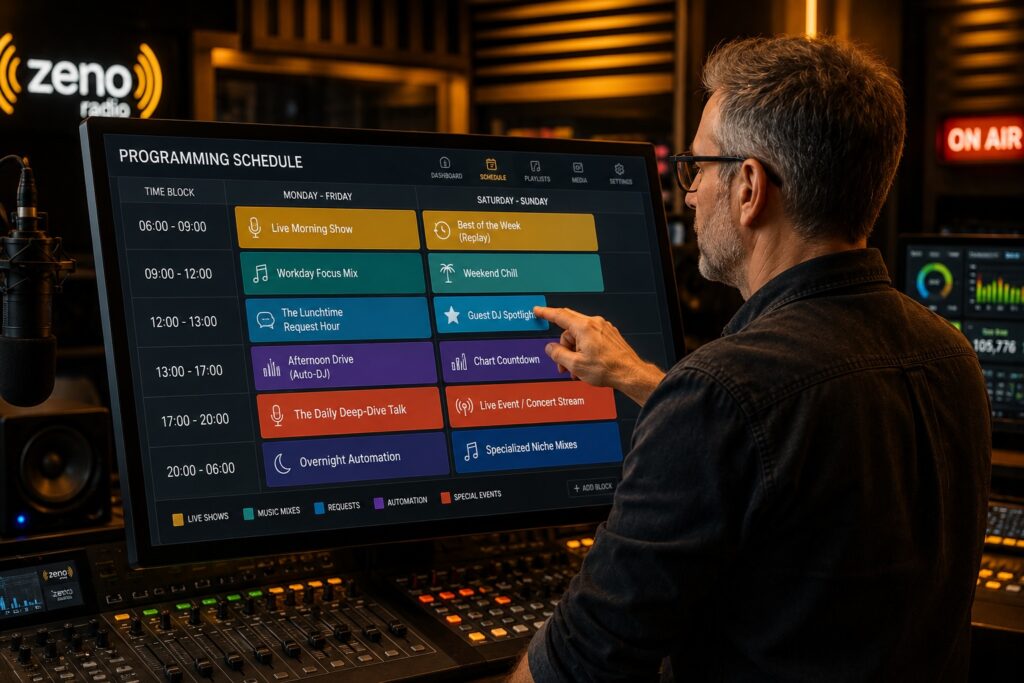
Weekly Programming Grid for Morning Drive
Use this weekly grid to balance your live shows with automated content, ensuring your station is always on and always engaging.
|
Time Block |
Monday – Friday |
Saturday – Sunday |
|---|---|---|
|
06:00 – 09:00 |
Live Morning Show for commuters in the car, with higher listener volume and strong value for targeting routine habits |
Best of the Week (Replay) |
|
09:00 – 12:00 |
Workday Focus Mix |
Weekend Chill |
|
12:00 – 13:00 |
The Lunchtime Request Hour |
Guest DJ Spotlight for children and families |
|
13:00 – 17:00 |
Afternoon Drive (Auto-DJ) |
Chart Countdown |
|
17:00 – 20:00 |
The Daily Deep-Dive Talk with local and international news |
Live Event/Concert Stream |
|
20:00 – 06:00 |
Overnight Automation |
Specialized Niche Mixes featuring history, science, and big ideas from around the world |
|
Listeners tune in differently across these blocks, which is why your weekly grid should vary by time and day. |
|
|
With your weekly schedule in place, the next step is to fill in the gaps and keep your station running smoothly with radio automation software like Zeno.
Automate the Empty Spaces to Prevent Dead Air
Automation allows you to broadcast 24/7 without live staff, making your station more cost-effective; professional broadcasters consider dead air one of the worst on-air problems. Scheduled automated rotations fill programming gaps and help you reach a global audience, no matter the time zone, especially when you start your online radio station with Zeno streaming.
As a rule of thumb, many stations treat 3 to 5 seconds of dead air as the limit, and anything longer than 5 seconds is unacceptable.
Master Your Schedule
-
Build and automate complex broadcast schedules with platforms like Zeno Automation Software or explore professional streaming plans for online radio.
-
Add silence sensors so personnel are alerted if dead air exceeds a few seconds, helping you catch silence fast and keep your station sounding professional.
-
Upload your shows in advance and set them to “fire” at specific times, such as 5:00 PM every Friday, so your live broadcasts can be automatically turned into on-demand podcasts with AI automation.
Remote Station Management
-
Stay in control remotely using the Zeno Tools web interface on your smartphone or tablet, and complement it with a dedicated radio station mobile app for iOS and Android.
-
Tweak playlists, check your stream status to confirm the station hasn’t gone silent, and manage your broadcast in real time, even when you’re away from the studio, which is especially important for public-facing service expectations during remote management.
Check the Tech
-
Review pricing and features for advanced automation, professional-grade broadcasting, and outage/performance monitoring with built-in analysis tools so you can catch issues before they affect the on-air signal; this matters across broadcast platforms, including radio and television, and helps ensure your plan aligns with your station’s growth.
With automation in place, your station can maintain a consistent, professional sound around the clock, while dedicated live broadcasting tools for online radio keep your real-time shows engaging and reliable.
FAQ: Programming & Scheduling
How much music do I need for a 24/7 radio station?
-
You should have at least 500-1,000 tracks in your library to avoid repetition and keep your daily listeners engaged.
Can I run a talk radio station with only talk content?
-
Yes, but “dead air” is more noticeable in talk radio because even short pauses can leave listeners confused about whether the station is still on. This matters even more when the broadcast relies on discussion and analysis rather than constant music.
-
Use jingles and music beds behind your voice to keep the energy up and maintain listener interest.
How often should I play my Station ID?
-
At least twice an hour.
-
This reminds listeners who they are listening to and helps with brand recognition.
A schedule is a promise to your listener. When they know what to expect, they build a habit of tuning in. Start with a simple clock, fill in your live hours, and let automation do the rest.
Build your first schedule today. Start on Zeno.fm.
June 3, 2026