22 August 2026
Dynamics 365 Virtual Entities - Simply Explained
M365.FM - Modern work, security, and productivity with Microsoft 365
About
What happens when your sales team works in Dynamics 365, but inventory lives in a warehouse system, invoices live in finance, and product information lives in an ERP? You could copy all that information into Dataverse, but then you create duplicate records, synchronization jobs, delays, and another place where information can become outdated. In this episode of M365 FM, Mirko Peters explains how Dynamics 365 Virtual Tables, formerly known as Virtual Entities, provide live access to external business data without requiring Dynamics 365 to store another copy.
WHAT ARE DYNAMICS 365 VIRTUAL TABLES?
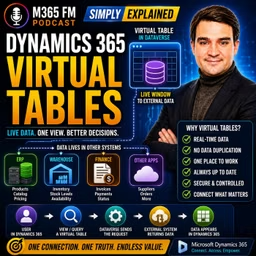
A Virtual Table is a table definition inside Microsoft Dataverse that points to records stored somewhere else. Dataverse understands what the information looks like—such as product name, available quantity, price, or invoice status—but the actual records remain in the external system. Think of it as a window into another business system. Dynamics 365 provides the familiar interface while the external application remains responsible for storing and managing the data.
VIRTUAL ENTITIES VS VIRTUAL TABLES
You may still encounter the term Virtual Entities in older documentation, implementations, and conversations. The current terminology is Virtual Tables. The underlying concept remains the same: Dynamics 365 and Dataverse can expose external information as though users were working with another Dataverse table, while the records themselves remain outside Dataverse.
WHY COPYING DATA CREATES PROBLEMS
Imagine your warehouse has ten units available when an overnight synchronization runs. The following morning, Dynamics 365 shows ten. At lunchtime, the warehouse ships all ten units. The warehouse system immediately knows inventory has reached zero, but Dynamics 365 could continue displaying ten until the next synchronization occurs. Your salesperson is now making decisions using outdated information. The problem isn't necessarily that synchronization failed. The problem is that the copied information became outdated between synchronization runs.
THE DUPLICATE RECORD PROBLEM
Copying information also creates another question: Which system owns the truth? The product exists in the ERP system, but another copy exists in Dataverse. Someone changes the description, price, status, or availability. Now somebody needs to determine which version should win. Virtual Tables avoid this problem by allowing the original business system to continue owning the record while Dynamics 365 users access that information when required.
THINK OF TWO FILING CABINETS
Imagine keeping identical documents in two filing cabinets. One cabinet belongs to sales and another belongs to the warehouse. Whenever somebody changes a document in one cabinet, they need to carry the updated copy to the other. Miss one update and the cabinets disagree. Traditional synchronization follows a similar pattern. Virtual Tables provide another approach: instead of maintaining the second copy, give the sales team a secure way to see information from the original cabinet.
ONE PLACE TO WORK DOESN'T REQUIRE ONE DATABASE
Organizations frequently say they want "one system." What employees often actually need is one place to work. A salesperson shouldn't need to open Dynamics 365, switch to the ERP to check inventory, open another application to check an invoice, and then return to the customer record. Virtual Tables can bring selected external information into the Dynamics 365 experience while allowing specialized systems to continue managing their respective business processes.
A LIVE WINDOW INTO EXTERNAL DATA
Suppose an account manager is discussing a large opportunity with a customer. The customer wants 500 units next month. While remaining inside Dynamics 365, the account manager opens related product availability information showing the item number, warehouse, available quantity, and expected replenishment date. That information can come directly from the external warehouse or ERP system rather than yesterday's imported inventory list. Dynamics 365 becomes the workspace while the warehouse system remains the inventory authority.
NORMAL DATAVERSE TABLE VS VIRTUAL TABLE
With a normal Dataverse table, the records are stored inside Dataverse. Accounts, contacts, opportunities, and cases are common examples. With a Virtual Table, Dataverse defines how the external information should appear and how to retrieve it, but the actual records remain somewhere else. The difference can be summarized as: Standard Table → Dataverse stores the record Virtual Table → Dataverse accesses the record from another system
THINK OF A LIBRARY CATALOG
A library catalog contains information describing a book. It tells you the title, author, and where to find it. But the catalog isn't the book. A Virtual Table works similarly. Dataverse understands the structure and knows how to request the record, but the external system contains the actual business data.
RUNTIME DATA ACCESS
Virtual Tables retrieve information when the application needs it. A user might open a view, search for particular records, apply a filter, or select an individual row. Dataverse then requests the relevant information from the external system. The objective isn't to fetch every external record and permanently store it. Instead, the application requests the information required for the current interaction.
THE THREE BUILDING BLOCKS
The episode explains three important components behind a Virtual Table: Data Provider → translates requests Data Source → identifies and connects to the external service Virtual Table → maps external information into a Dataverse table structure Together, these components allow Dynamics 365 to request external records and present them through a familiar user experience.
WHAT IS A DATA PROVIDER?
The Data Provider acts as a translator. Dynamics 365 and Dataverse send requests using their own concepts—tables, columns, filters, and record IDs. The external system might use another API or data format. The provider translates between those two sides. Users don't need to understand that conversation. They interact with the resulting records through the Dynamics 365 application.
WHAT IS A DATA SOURCE?
If the provider knows how to communicate, the Data Source identifies where to communicate. The Data Source contains connection information for the external service. This can include the service address, authentication information, and connection-related settings. Think of the Data Provider as knowing the language and the Data Source as containing the address and connection details required to reach the correct system.
ODATA V4
Dataverse includes support for an OData Version 4 provider. OData provides a standardized approach for exposing and requesting data over the web. An external service might expose products containing fields such as product number, description, unit price, and available quantity. The provider can request those records and return them in a structure Dataverse understands. This provides a common integration approach when the external application already supports OData V4.
CUSTOM DATA PROVIDERS
Not every external business application supports OData. Organizations can use custom Data Providers when another integration method is required. A developer might create a provider connecting Dataverse with a REST API, database, or proprietary company service. The custom provider still performs the same fundamental job: Receive the Dataverse request → communicate with the external system → translate the response → return records to Dataverse.
MAPPING EXTERNAL COLUMNS
The Virtual Table defines how external fields should appear inside Dataverse. The warehouse application might call a field Available Quantity, while Dynamics 365 users see Stock on Hand. The mapping tells Dataverse that these fields represent the same information. This allows organizations to provide user-friendly terminology inside Dynamics 365 without requiring the external system to rename its own fields.
UNIQUE RECORD IDS
Dataverse needs to distinguish one external record from another. Virtual Table records therefore require dependable unique identifiers that Dataverse can recognize. Without a reliable ID, Dataverse can't confidently determine which exact product, invoice, customer, or other external record the user selected. Record identity is therefore an important technical requirement when evaluating whether an external data source can work effectively through Virtual Tables.
FOLLOWING A VIRTUAL TABLE REQUEST
Imagine a salesperson opens a product list and filters for available items. Dataverse recognizes that the request targets a Virtual Table. The Data Provider receives the request. The Data Source provides the information required to contact the external service. The provider translates the filter into something the external service understands. The source system returns matching records. The provider converts those results into Dataverse rows. Dynamics 365 displays them in the familiar interface. The user sees a normal-looking product list while the data remains in the external system.
WHERE VIRTUAL TABLES FIT BEST
Virtual Tables work particularly well when another system clearly owns the information but Dynamics 365 users need that information during their normal work. Examples include live inventory, product information, purchase status, invoice status, finance information, supplier catalogs, and selected marketing information. The external application remains responsible for managing the lifecycle of the record. Dynamics 365 provides contextual access to that record alongside the customer's sales or service information.
Become a supporter of this podcast: https://www.spreaker.com/podcast/m365-fm-modern-work-security-and-productivity-with-microsoft-365--6704921/support.
WHAT ARE DYNAMICS 365 VIRTUAL TABLES?
A Virtual Table is a table definition inside Microsoft Dataverse that points to records stored somewhere else. Dataverse understands what the information looks like—such as product name, available quantity, price, or invoice status—but the actual records remain in the external system. Think of it as a window into another business system. Dynamics 365 provides the familiar interface while the external application remains responsible for storing and managing the data.
VIRTUAL ENTITIES VS VIRTUAL TABLES
You may still encounter the term Virtual Entities in older documentation, implementations, and conversations. The current terminology is Virtual Tables. The underlying concept remains the same: Dynamics 365 and Dataverse can expose external information as though users were working with another Dataverse table, while the records themselves remain outside Dataverse.
WHY COPYING DATA CREATES PROBLEMS
Imagine your warehouse has ten units available when an overnight synchronization runs. The following morning, Dynamics 365 shows ten. At lunchtime, the warehouse ships all ten units. The warehouse system immediately knows inventory has reached zero, but Dynamics 365 could continue displaying ten until the next synchronization occurs. Your salesperson is now making decisions using outdated information. The problem isn't necessarily that synchronization failed. The problem is that the copied information became outdated between synchronization runs.
THE DUPLICATE RECORD PROBLEM
Copying information also creates another question: Which system owns the truth? The product exists in the ERP system, but another copy exists in Dataverse. Someone changes the description, price, status, or availability. Now somebody needs to determine which version should win. Virtual Tables avoid this problem by allowing the original business system to continue owning the record while Dynamics 365 users access that information when required.
THINK OF TWO FILING CABINETS
Imagine keeping identical documents in two filing cabinets. One cabinet belongs to sales and another belongs to the warehouse. Whenever somebody changes a document in one cabinet, they need to carry the updated copy to the other. Miss one update and the cabinets disagree. Traditional synchronization follows a similar pattern. Virtual Tables provide another approach: instead of maintaining the second copy, give the sales team a secure way to see information from the original cabinet.
ONE PLACE TO WORK DOESN'T REQUIRE ONE DATABASE
Organizations frequently say they want "one system." What employees often actually need is one place to work. A salesperson shouldn't need to open Dynamics 365, switch to the ERP to check inventory, open another application to check an invoice, and then return to the customer record. Virtual Tables can bring selected external information into the Dynamics 365 experience while allowing specialized systems to continue managing their respective business processes.
A LIVE WINDOW INTO EXTERNAL DATA
Suppose an account manager is discussing a large opportunity with a customer. The customer wants 500 units next month. While remaining inside Dynamics 365, the account manager opens related product availability information showing the item number, warehouse, available quantity, and expected replenishment date. That information can come directly from the external warehouse or ERP system rather than yesterday's imported inventory list. Dynamics 365 becomes the workspace while the warehouse system remains the inventory authority.
NORMAL DATAVERSE TABLE VS VIRTUAL TABLE
With a normal Dataverse table, the records are stored inside Dataverse. Accounts, contacts, opportunities, and cases are common examples. With a Virtual Table, Dataverse defines how the external information should appear and how to retrieve it, but the actual records remain somewhere else. The difference can be summarized as: Standard Table → Dataverse stores the record Virtual Table → Dataverse accesses the record from another system
THINK OF A LIBRARY CATALOG
A library catalog contains information describing a book. It tells you the title, author, and where to find it. But the catalog isn't the book. A Virtual Table works similarly. Dataverse understands the structure and knows how to request the record, but the external system contains the actual business data.
RUNTIME DATA ACCESS
Virtual Tables retrieve information when the application needs it. A user might open a view, search for particular records, apply a filter, or select an individual row. Dataverse then requests the relevant information from the external system. The objective isn't to fetch every external record and permanently store it. Instead, the application requests the information required for the current interaction.
THE THREE BUILDING BLOCKS
The episode explains three important components behind a Virtual Table: Data Provider → translates requests Data Source → identifies and connects to the external service Virtual Table → maps external information into a Dataverse table structure Together, these components allow Dynamics 365 to request external records and present them through a familiar user experience.
WHAT IS A DATA PROVIDER?
The Data Provider acts as a translator. Dynamics 365 and Dataverse send requests using their own concepts—tables, columns, filters, and record IDs. The external system might use another API or data format. The provider translates between those two sides. Users don't need to understand that conversation. They interact with the resulting records through the Dynamics 365 application.
WHAT IS A DATA SOURCE?
If the provider knows how to communicate, the Data Source identifies where to communicate. The Data Source contains connection information for the external service. This can include the service address, authentication information, and connection-related settings. Think of the Data Provider as knowing the language and the Data Source as containing the address and connection details required to reach the correct system.
ODATA V4
Dataverse includes support for an OData Version 4 provider. OData provides a standardized approach for exposing and requesting data over the web. An external service might expose products containing fields such as product number, description, unit price, and available quantity. The provider can request those records and return them in a structure Dataverse understands. This provides a common integration approach when the external application already supports OData V4.
CUSTOM DATA PROVIDERS
Not every external business application supports OData. Organizations can use custom Data Providers when another integration method is required. A developer might create a provider connecting Dataverse with a REST API, database, or proprietary company service. The custom provider still performs the same fundamental job: Receive the Dataverse request → communicate with the external system → translate the response → return records to Dataverse.
MAPPING EXTERNAL COLUMNS
The Virtual Table defines how external fields should appear inside Dataverse. The warehouse application might call a field Available Quantity, while Dynamics 365 users see Stock on Hand. The mapping tells Dataverse that these fields represent the same information. This allows organizations to provide user-friendly terminology inside Dynamics 365 without requiring the external system to rename its own fields.
UNIQUE RECORD IDS
Dataverse needs to distinguish one external record from another. Virtual Table records therefore require dependable unique identifiers that Dataverse can recognize. Without a reliable ID, Dataverse can't confidently determine which exact product, invoice, customer, or other external record the user selected. Record identity is therefore an important technical requirement when evaluating whether an external data source can work effectively through Virtual Tables.
FOLLOWING A VIRTUAL TABLE REQUEST
Imagine a salesperson opens a product list and filters for available items. Dataverse recognizes that the request targets a Virtual Table. The Data Provider receives the request. The Data Source provides the information required to contact the external service. The provider translates the filter into something the external service understands. The source system returns matching records. The provider converts those results into Dataverse rows. Dynamics 365 displays them in the familiar interface. The user sees a normal-looking product list while the data remains in the external system.
WHERE VIRTUAL TABLES FIT BEST
Virtual Tables work particularly well when another system clearly owns the information but Dynamics 365 users need that information during their normal work. Examples include live inventory, product information, purchase status, invoice status, finance information, supplier catalogs, and selected marketing information. The external application remains responsible for managing the lifecycle of the record. Dynamics 365 provides contextual access to that record alongside the customer's sales or service information.
Become a supporter of this podcast: https://www.spreaker.com/podcast/m365-fm-modern-work-security-and-productivity-with-microsoft-365--6704921/support.