22 August 2026
Dynamics 365 Dual-write - Simply Explained
M365.FM - Modern work, security, and productivity with Microsoft 365
About
A salesperson updates a customer address in Dynamics 365 Sales. Later, someone in finance opens the same customer and still sees the old address. Which one is correct? When sales, service, finance, and operations work in different applications, shared business data can quickly become duplicated or inconsistent. In this episode of M365 FM, Mirko Peters explains how Dynamics 365 Dual-write connects Finance and Operations apps with Microsoft Dataverse so supported records such as customers, addresses, contacts, products, and orders can remain synchronized as teams work.
WHAT IS DYNAMICS 365 DUAL-WRITE?
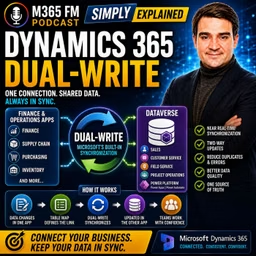
Dual-write is Microsoft's built-in connection between Dynamics 365 Finance and Operations apps and Microsoft Dataverse. Think of an organization as having a front office and a back office. The front office includes salespeople, service agents, field workers, and other customer-facing teams. The back office handles finance, inventory, purchasing, orders, fulfillment, and other operational processes. Both sides work with many of the same customers and products, but they need different applications for their jobs. Dual-write creates a controlled connection between those environments so selected shared records can remain synchronized without employees manually copying information between applications.
THE BUSINESS PROBLEM DUAL-WRITE SOLVES
Without integration, one customer can quietly become two different records. Sales might have Northwind Bikes with the customer's new address. Finance might have Northwind Bicycle Company with the previous address. Both records can look correct when viewed independently, but they no longer describe exactly the same business relationship. Employees then become the integration layer. They export spreadsheets, send emails, compare records, re-enter information, and investigate which version is correct. Dual-write is designed to reduce that manual handoff.
FRONT OFFICE AND BACK OFFICE
Dynamics 365 applications support different types of work. Dynamics 365 Sales focuses on leads, opportunities, customer relationships, and sales conversations. Customer Service manages customer questions and cases. Field Service supports technicians and work performed at customer locations. Finance and Supply Chain Management handle areas such as accounting, inventory, products, purchasing, orders, and fulfillment. The objective isn't to force every employee into one giant application. Instead, employees continue using the application appropriate for their role while selected business information remains connected behind the scenes.
MICROSOFT DATAVERSE
Dataverse is the shared data foundation behind many Microsoft business applications. Dynamics 365 Sales, Customer Service, Field Service, parts of Project Operations, Power Apps, and Power Automate can work with Dataverse. For understanding Dual-write, think of Dataverse as the common data area on the customer-application side. Finance and Operations remains the operational foundation on the other side. Dual-write connects selected records between these environments.
THINK OF DUAL-WRITE AS AN INTERNAL DOOR
Imagine an office building with customer-facing teams on one side and finance and operations on the other. Without integration, somebody has to carry information between them. They might send an email, move a spreadsheet, or manually enter the information again. Dual-write acts like a staffed internal door. When a supported record changes on one side, Dual-write can pass the related change through that door according to predefined rules. Each team keeps its own workspace while shared information remains connected.
WHAT ARE TABLE MAPS?
Dual-write doesn't blindly synchronize every piece of information. It works through defined connections called table maps. A table stores a particular type of record. A customer table contains customer records. A product table contains products. An address table contains address information. A table map tells Dual-write which table in Finance and Operations corresponds with which table in Dataverse. It also defines how relevant fields relate to each other. Think of the table map as the translation sheet between the two systems.
TWO-WAY SYNCHRONIZATION
The word dual reflects the ability of supported maps to synchronize changes in both directions. A supported update in Dataverse can update the corresponding record in Finance and Operations. A supported update in Finance and Operations can also update the related Dataverse record. However, this doesn't mean every table or every field should automatically move in both directions. Organizations still need clear rules about which system owns particular information.
NEAR REAL-TIME DATA
Dual-write is designed for business information employees need while they're actively working. Instead of waiting for an overnight synchronization job, supported changes can move between the environments in near real time. Near real time doesn't mean absolutely zero delay. It means the connection supports live operational processes rather than relying primarily on scheduled file exchanges. A salesperson shouldn't need to wait until tomorrow morning before finance sees an important customer update.
WHAT DATA CAN DUAL-WRITE CONNECT?
Common examples include customers, addresses, contacts, products, vendors, company information, organizational structures, and finance or tax reference information. The exact records depend on the Dynamics 365 applications and business processes an organization uses. The important principle is not to synchronize everything possible. Synchronize information that genuinely needs to represent the same business record across both environments. ㅤ
CUSTOMER RECORDS
Customers are one of the clearest examples. Sales needs information such as customer names, contacts, phone numbers, and delivery information. Finance needs the legal customer record, billing information, and the details required for orders and invoices. Dual-write can keep supported customer information connected while allowing each team to continue working inside the Dynamics 365 application designed for its responsibilities.
ADDRESSES AND CONTACTS
Customer information is more complicated than one company name. A customer can have a billing address, shipping address, and service location. The organization might also work with buyers, Accounts Payable contacts, service managers, and other people within the same customer organization. Connected address and contact structures help sales, service, finance, and operations work with related information without independently rebuilding those relationships in every application.
PRODUCT INFORMATION
Products provide an example where ownership frequently becomes important. Finance and Operations often owns product creation because operations controls product master information, stock units, and other details required to sell and deliver products. Once the product is prepared for customer-facing work, Dual-write can send related product information into Dataverse. Sales users can then work with those products without somebody manually recreating the product catalog in another application.
ONE-WAY VS TWO-WAY MAPS
Not every business record needs two-way synchronization. Some maps support changes in both directions because both sides have a legitimate reason to maintain information. Other records have a clearer owner. Products provide a useful example: operations might create and govern the product while sales simply receives and uses that information. The correct synchronization direction should follow the organization's actual data ownership model.
DATA OWNERSHIP MATTERS
Before synchronizing information, organizations need to answer: Where does this record begin? Who can change it? Which system wins when information conflicts? Who corrects an incorrect value? For example, sales might own relationship and contact information while finance owns payment-related information and operations owns products and inventory. The exact ownership model depends on the business. What matters is that the ownership is clearly defined before automation begins moving changes between applications.
HOW A CHANGE TRAVELS
Imagine a salesperson speaking with a customer who recently moved. The salesperson updates the customer's street address in Dynamics 365 Sales and saves the record. Sales stores that change in Dataverse. Dual-write checks the relevant table map and identifies the corresponding customer and address information in Finance and Operations. The supported update travels across automatically. When finance later opens the customer record, the updated address is available without somebody manually entering it again.
SYNCHRONOUS BUSINESS PROCESSES
For normal day-to-day operations, the connection is designed to process related updates as part of the current working process instead of placing everything into a background synchronization job that might execute much later. This matters because employees make decisions based on what they see now. Customer addresses, product details, and other shared information shouldn't quietly drift apart for hours before somebody discovers the difference. When synchronization fails, that failure needs attention rather than remaining hidden until another team discovers inconsistent data.
Become a supporter of this podcast: https://www.spreaker.com/podcast/m365-fm-modern-work-security-and-productivity-with-microsoft-365--6704921/support.
WHAT IS DYNAMICS 365 DUAL-WRITE?
Dual-write is Microsoft's built-in connection between Dynamics 365 Finance and Operations apps and Microsoft Dataverse. Think of an organization as having a front office and a back office. The front office includes salespeople, service agents, field workers, and other customer-facing teams. The back office handles finance, inventory, purchasing, orders, fulfillment, and other operational processes. Both sides work with many of the same customers and products, but they need different applications for their jobs. Dual-write creates a controlled connection between those environments so selected shared records can remain synchronized without employees manually copying information between applications.
THE BUSINESS PROBLEM DUAL-WRITE SOLVES
Without integration, one customer can quietly become two different records. Sales might have Northwind Bikes with the customer's new address. Finance might have Northwind Bicycle Company with the previous address. Both records can look correct when viewed independently, but they no longer describe exactly the same business relationship. Employees then become the integration layer. They export spreadsheets, send emails, compare records, re-enter information, and investigate which version is correct. Dual-write is designed to reduce that manual handoff.
FRONT OFFICE AND BACK OFFICE
Dynamics 365 applications support different types of work. Dynamics 365 Sales focuses on leads, opportunities, customer relationships, and sales conversations. Customer Service manages customer questions and cases. Field Service supports technicians and work performed at customer locations. Finance and Supply Chain Management handle areas such as accounting, inventory, products, purchasing, orders, and fulfillment. The objective isn't to force every employee into one giant application. Instead, employees continue using the application appropriate for their role while selected business information remains connected behind the scenes.
MICROSOFT DATAVERSE
Dataverse is the shared data foundation behind many Microsoft business applications. Dynamics 365 Sales, Customer Service, Field Service, parts of Project Operations, Power Apps, and Power Automate can work with Dataverse. For understanding Dual-write, think of Dataverse as the common data area on the customer-application side. Finance and Operations remains the operational foundation on the other side. Dual-write connects selected records between these environments.
THINK OF DUAL-WRITE AS AN INTERNAL DOOR
Imagine an office building with customer-facing teams on one side and finance and operations on the other. Without integration, somebody has to carry information between them. They might send an email, move a spreadsheet, or manually enter the information again. Dual-write acts like a staffed internal door. When a supported record changes on one side, Dual-write can pass the related change through that door according to predefined rules. Each team keeps its own workspace while shared information remains connected.
WHAT ARE TABLE MAPS?
Dual-write doesn't blindly synchronize every piece of information. It works through defined connections called table maps. A table stores a particular type of record. A customer table contains customer records. A product table contains products. An address table contains address information. A table map tells Dual-write which table in Finance and Operations corresponds with which table in Dataverse. It also defines how relevant fields relate to each other. Think of the table map as the translation sheet between the two systems.
TWO-WAY SYNCHRONIZATION
The word dual reflects the ability of supported maps to synchronize changes in both directions. A supported update in Dataverse can update the corresponding record in Finance and Operations. A supported update in Finance and Operations can also update the related Dataverse record. However, this doesn't mean every table or every field should automatically move in both directions. Organizations still need clear rules about which system owns particular information.
NEAR REAL-TIME DATA
Dual-write is designed for business information employees need while they're actively working. Instead of waiting for an overnight synchronization job, supported changes can move between the environments in near real time. Near real time doesn't mean absolutely zero delay. It means the connection supports live operational processes rather than relying primarily on scheduled file exchanges. A salesperson shouldn't need to wait until tomorrow morning before finance sees an important customer update.
WHAT DATA CAN DUAL-WRITE CONNECT?
Common examples include customers, addresses, contacts, products, vendors, company information, organizational structures, and finance or tax reference information. The exact records depend on the Dynamics 365 applications and business processes an organization uses. The important principle is not to synchronize everything possible. Synchronize information that genuinely needs to represent the same business record across both environments. ㅤ
CUSTOMER RECORDS
Customers are one of the clearest examples. Sales needs information such as customer names, contacts, phone numbers, and delivery information. Finance needs the legal customer record, billing information, and the details required for orders and invoices. Dual-write can keep supported customer information connected while allowing each team to continue working inside the Dynamics 365 application designed for its responsibilities.
ADDRESSES AND CONTACTS
Customer information is more complicated than one company name. A customer can have a billing address, shipping address, and service location. The organization might also work with buyers, Accounts Payable contacts, service managers, and other people within the same customer organization. Connected address and contact structures help sales, service, finance, and operations work with related information without independently rebuilding those relationships in every application.
PRODUCT INFORMATION
Products provide an example where ownership frequently becomes important. Finance and Operations often owns product creation because operations controls product master information, stock units, and other details required to sell and deliver products. Once the product is prepared for customer-facing work, Dual-write can send related product information into Dataverse. Sales users can then work with those products without somebody manually recreating the product catalog in another application.
ONE-WAY VS TWO-WAY MAPS
Not every business record needs two-way synchronization. Some maps support changes in both directions because both sides have a legitimate reason to maintain information. Other records have a clearer owner. Products provide a useful example: operations might create and govern the product while sales simply receives and uses that information. The correct synchronization direction should follow the organization's actual data ownership model.
DATA OWNERSHIP MATTERS
Before synchronizing information, organizations need to answer: Where does this record begin? Who can change it? Which system wins when information conflicts? Who corrects an incorrect value? For example, sales might own relationship and contact information while finance owns payment-related information and operations owns products and inventory. The exact ownership model depends on the business. What matters is that the ownership is clearly defined before automation begins moving changes between applications.
HOW A CHANGE TRAVELS
Imagine a salesperson speaking with a customer who recently moved. The salesperson updates the customer's street address in Dynamics 365 Sales and saves the record. Sales stores that change in Dataverse. Dual-write checks the relevant table map and identifies the corresponding customer and address information in Finance and Operations. The supported update travels across automatically. When finance later opens the customer record, the updated address is available without somebody manually entering it again.
SYNCHRONOUS BUSINESS PROCESSES
For normal day-to-day operations, the connection is designed to process related updates as part of the current working process instead of placing everything into a background synchronization job that might execute much later. This matters because employees make decisions based on what they see now. Customer addresses, product details, and other shared information shouldn't quietly drift apart for hours before somebody discovers the difference. When synchronization fails, that failure needs attention rather than remaining hidden until another team discovers inconsistent data.
Become a supporter of this podcast: https://www.spreaker.com/podcast/m365-fm-modern-work-security-and-productivity-with-microsoft-365--6704921/support.