21 August 2026
Dynamics 365 Business Central Extensions - Simply Explained
M365.FM - Modern work, security, and productivity with Microsoft 365
About
Dynamics 365 Business Central already provides capabilities for finance, sales, purchasing, inventory, projects, and other core business processes. But no two organizations operate exactly the same way. A company might need specialized shipping, local financial reports, additional approval rules, bank integrations, electronic invoicing, or a connection to another business system. In this episode of M365 FM, Mirko Peters explains how Business Central extensions add these capabilities without directly modifying the standard application—and what organizations should check before installing them.
WHAT ARE BUSINESS CENTRAL EXTENSIONS?
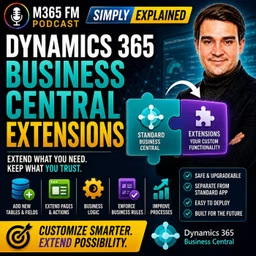
A Business Central extension is an add-on package that adds capabilities to Dynamics 365 Business Central or changes how part of the standard application works for a particular organization. An extension can be extremely small. It might add one required field to a customer card or introduce a new validation rule. It can also support an entire business process. A shipping extension might generate carrier labels, send parcel information to a shipping provider, and return tracking numbers to Business Central. The objective is to add the missing capability while keeping the standard Business Central foundation intact.
THINK OF EXTENSIONS LIKE APPS ON YOUR PHONE
A smartphone already contains core functionality such as calling, messaging, and a camera. You then install additional apps based on what you need. Business Central extensions follow a similar principle. Business Central provides the standard ERP foundation. Extensions add capabilities required by a particular organization, industry, country, or process. Instead of rebuilding the underlying application, organizations extend it with modular functionality.
WHAT CAN AN EXTENSION CHANGE?
Extensions can add fields, pages, reports, actions, rules, integrations, and business logic. For example, an extension could add a new button to a sales order, introduce another column to a list, change an invoice layout, or connect Business Central with an external service. Business logic allows extensions to enforce company-specific rules. An organization could prevent an order from being released until somebody enters a purchase order number or automatically start an approval process when an order exceeds a particular amount.
WHY EXTENSIONS ARE BETTER THAN CHANGING THE CORE CODE
Historically, organizations frequently customized ERP systems by directly changing the standard application code. That can create problems when the software vendor releases updates. The updated standard application expects the underlying system to behave in a particular way, while custom modifications may conflict with those changes. Extensions take a different approach. Their code remains separate from the standard Business Central application. Microsoft can update the core application while the organization's extensions remain separate packages. Extensions can still require compatibility testing, but this architecture provides a cleaner foundation for maintaining custom functionality.
STANDARD FIRST, EXTEND SECOND
Extensions shouldn't become an excuse to recreate an organization's old ERP system inside Business Central. Business Central already handles significant amounts of standard business functionality. Before creating or installing an extension, organizations should therefore ask whether a genuine business gap exists. Sometimes the right extension contains an entire integration. Sometimes the best solution is simply one additional field and one validation rule. The goal is to preserve the standard foundation while adding only what the business genuinely requires.
THE MAIN TYPES OF BUSINESS CENTRAL EXTENSIONS
Business Central extensions can originate from different sources. Some are packaged applications designed for common requirements. Others come from Microsoft or independent software vendors. Organizations can also create extensions specifically for their own Business Central environment. Understanding where an extension comes from helps determine how it should be evaluated, supported, maintained, and updated.
APP EXTENSIONS
An app extension is a packaged add-on designed to perform a particular job inside Business Central. A shipping app might connect orders with a carrier. A payment application could integrate with a payment provider. A reporting extension might add specialized financial reports. Once configured, users generally interact with these capabilities directly inside Business Central. The extension can add its own pages or introduce additional functionality into familiar areas such as sales orders, purchase orders, customer cards, and invoices.
MICROSOFT EXTENSIONS
Microsoft itself provides extensions for requirements that don't necessarily belong in the standard application for every customer. Localization is one example. Tax requirements, invoices, payments, and statutory documents differ between countries. Functionality required by organizations in one country might be completely irrelevant somewhere else. Extensions allow Microsoft to provide these capabilities without adding every possible country-specific requirement to the standard application.
ISV EXTENSIONS
ISV stands for Independent Software Vendor. These are software companies creating Business Central applications that can be used by multiple customers. An ISV might specialize in warehouse management, manufacturing, retail, payroll integrations, document management, electronic invoicing, banking, shipping, or industry-specific reporting. Instead of every Business Central customer developing the same functionality independently, an ISV creates a reusable application that multiple organizations can purchase or subscribe to.
MICROSOFT APPSOURCE
Many third-party Business Central applications can be found through Microsoft AppSource. AppSource acts as a marketplace where organizations can discover applications designed to extend Microsoft business applications. This can be particularly useful when the business requirement is common. If hundreds of companies need to connect Business Central with the same shipping company, bank, payment provider, or electronic invoicing platform, purchasing an established application may make more sense than developing another integration from scratch.
PER-TENANT EXTENSIONS
A per-tenant extension is developed specifically for one organization's Business Central environment rather than being published for every customer. This approach can make sense when the business requirement is genuinely unique. A distributor might have an unusual process for calculating delivery charges based on temperature-controlled transportation, delivery zones, returnable containers, and customer-specific agreements. If no existing application fits that requirement, a Business Central partner or developer can create a dedicated extension around the company's process.
CUSTOM DOESN'T AUTOMATICALLY MEAN BETTER
A custom extension can closely match the organization's process, but somebody must own it. Documentation needs to be maintained. Updates need testing. Problems need support. Changes to the business process may require development work. If an existing ISV application already solves the requirement, it may provide a more maintainable option. The decision should therefore begin with the business requirement—not with an assumption that custom development is always more powerful.
HOW EXTENSIONS CHANGE DAILY WORK
Users frequently experience extensions directly on Business Central pages they already know. An extension might add another field to a customer card, another action to a sales order, or additional information to an item card. Imagine a company requiring a delivery window for every customer. An extension could add that information to the customer record and then display it directly on the sales order. Employees don't need another spreadsheet or email containing the delivery requirement because the information appears where they perform the work.
PAGE EXTENSIONS
Page extensions modify the Business Central user experience without replacing the complete standard page. They can introduce fields, buttons, actions, and other elements. A new button might create a shipping label, send a payment reminder, open a related document, or initiate an approval request. The user continues working inside the familiar Business Central interface while the extension provides additional functionality directly within the relevant business record.
REPORT EXTENSIONS
Organizations frequently require documents and reports that differ from Business Central's standard output. An invoice might need additional legal text, another reference number, specific company information, or different layouts for domestic and international customers. Report extensions can add information or provide alternative layouts while preserving the standard report. Extensions can also enhance internal management, finance, and inventory reports with additional company-specific information.
PERMISSION SET EXTENSIONS
Adding functionality doesn't mean every employee should automatically receive access to it. Permissions determine what users can view, modify, post, or delete. An extension might introduce a new payment process required by finance employees or a shipping action required by warehouse workers. Permission set extensions can provide the necessary access structure for those new capabilities. The organization still determines which employees or groups should receive those permissions based on their responsibilities.
Become a supporter of this podcast: https://www.spreaker.com/podcast/m365-fm-modern-work-security-and-productivity-with-microsoft-365--6704921/support.
WHAT ARE BUSINESS CENTRAL EXTENSIONS?
A Business Central extension is an add-on package that adds capabilities to Dynamics 365 Business Central or changes how part of the standard application works for a particular organization. An extension can be extremely small. It might add one required field to a customer card or introduce a new validation rule. It can also support an entire business process. A shipping extension might generate carrier labels, send parcel information to a shipping provider, and return tracking numbers to Business Central. The objective is to add the missing capability while keeping the standard Business Central foundation intact.
THINK OF EXTENSIONS LIKE APPS ON YOUR PHONE
A smartphone already contains core functionality such as calling, messaging, and a camera. You then install additional apps based on what you need. Business Central extensions follow a similar principle. Business Central provides the standard ERP foundation. Extensions add capabilities required by a particular organization, industry, country, or process. Instead of rebuilding the underlying application, organizations extend it with modular functionality.
WHAT CAN AN EXTENSION CHANGE?
Extensions can add fields, pages, reports, actions, rules, integrations, and business logic. For example, an extension could add a new button to a sales order, introduce another column to a list, change an invoice layout, or connect Business Central with an external service. Business logic allows extensions to enforce company-specific rules. An organization could prevent an order from being released until somebody enters a purchase order number or automatically start an approval process when an order exceeds a particular amount.
WHY EXTENSIONS ARE BETTER THAN CHANGING THE CORE CODE
Historically, organizations frequently customized ERP systems by directly changing the standard application code. That can create problems when the software vendor releases updates. The updated standard application expects the underlying system to behave in a particular way, while custom modifications may conflict with those changes. Extensions take a different approach. Their code remains separate from the standard Business Central application. Microsoft can update the core application while the organization's extensions remain separate packages. Extensions can still require compatibility testing, but this architecture provides a cleaner foundation for maintaining custom functionality.
STANDARD FIRST, EXTEND SECOND
Extensions shouldn't become an excuse to recreate an organization's old ERP system inside Business Central. Business Central already handles significant amounts of standard business functionality. Before creating or installing an extension, organizations should therefore ask whether a genuine business gap exists. Sometimes the right extension contains an entire integration. Sometimes the best solution is simply one additional field and one validation rule. The goal is to preserve the standard foundation while adding only what the business genuinely requires.
THE MAIN TYPES OF BUSINESS CENTRAL EXTENSIONS
Business Central extensions can originate from different sources. Some are packaged applications designed for common requirements. Others come from Microsoft or independent software vendors. Organizations can also create extensions specifically for their own Business Central environment. Understanding where an extension comes from helps determine how it should be evaluated, supported, maintained, and updated.
APP EXTENSIONS
An app extension is a packaged add-on designed to perform a particular job inside Business Central. A shipping app might connect orders with a carrier. A payment application could integrate with a payment provider. A reporting extension might add specialized financial reports. Once configured, users generally interact with these capabilities directly inside Business Central. The extension can add its own pages or introduce additional functionality into familiar areas such as sales orders, purchase orders, customer cards, and invoices.
MICROSOFT EXTENSIONS
Microsoft itself provides extensions for requirements that don't necessarily belong in the standard application for every customer. Localization is one example. Tax requirements, invoices, payments, and statutory documents differ between countries. Functionality required by organizations in one country might be completely irrelevant somewhere else. Extensions allow Microsoft to provide these capabilities without adding every possible country-specific requirement to the standard application.
ISV EXTENSIONS
ISV stands for Independent Software Vendor. These are software companies creating Business Central applications that can be used by multiple customers. An ISV might specialize in warehouse management, manufacturing, retail, payroll integrations, document management, electronic invoicing, banking, shipping, or industry-specific reporting. Instead of every Business Central customer developing the same functionality independently, an ISV creates a reusable application that multiple organizations can purchase or subscribe to.
MICROSOFT APPSOURCE
Many third-party Business Central applications can be found through Microsoft AppSource. AppSource acts as a marketplace where organizations can discover applications designed to extend Microsoft business applications. This can be particularly useful when the business requirement is common. If hundreds of companies need to connect Business Central with the same shipping company, bank, payment provider, or electronic invoicing platform, purchasing an established application may make more sense than developing another integration from scratch.
PER-TENANT EXTENSIONS
A per-tenant extension is developed specifically for one organization's Business Central environment rather than being published for every customer. This approach can make sense when the business requirement is genuinely unique. A distributor might have an unusual process for calculating delivery charges based on temperature-controlled transportation, delivery zones, returnable containers, and customer-specific agreements. If no existing application fits that requirement, a Business Central partner or developer can create a dedicated extension around the company's process.
CUSTOM DOESN'T AUTOMATICALLY MEAN BETTER
A custom extension can closely match the organization's process, but somebody must own it. Documentation needs to be maintained. Updates need testing. Problems need support. Changes to the business process may require development work. If an existing ISV application already solves the requirement, it may provide a more maintainable option. The decision should therefore begin with the business requirement—not with an assumption that custom development is always more powerful.
HOW EXTENSIONS CHANGE DAILY WORK
Users frequently experience extensions directly on Business Central pages they already know. An extension might add another field to a customer card, another action to a sales order, or additional information to an item card. Imagine a company requiring a delivery window for every customer. An extension could add that information to the customer record and then display it directly on the sales order. Employees don't need another spreadsheet or email containing the delivery requirement because the information appears where they perform the work.
PAGE EXTENSIONS
Page extensions modify the Business Central user experience without replacing the complete standard page. They can introduce fields, buttons, actions, and other elements. A new button might create a shipping label, send a payment reminder, open a related document, or initiate an approval request. The user continues working inside the familiar Business Central interface while the extension provides additional functionality directly within the relevant business record.
REPORT EXTENSIONS
Organizations frequently require documents and reports that differ from Business Central's standard output. An invoice might need additional legal text, another reference number, specific company information, or different layouts for domestic and international customers. Report extensions can add information or provide alternative layouts while preserving the standard report. Extensions can also enhance internal management, finance, and inventory reports with additional company-specific information.
PERMISSION SET EXTENSIONS
Adding functionality doesn't mean every employee should automatically receive access to it. Permissions determine what users can view, modify, post, or delete. An extension might introduce a new payment process required by finance employees or a shipping action required by warehouse workers. Permission set extensions can provide the necessary access structure for those new capabilities. The organization still determines which employees or groups should receive those permissions based on their responsibilities.
Become a supporter of this podcast: https://www.spreaker.com/podcast/m365-fm-modern-work-security-and-productivity-with-microsoft-365--6704921/support.