22 August 2026
Dynamics 365 Business Central AL Development
M365.FM - Modern work, security, and productivity with Microsoft 365
About
Business Central handles finance, customers, sales orders, inventory, and invoices out of the box. But what happens when your company needs one additional field, a custom approval step, a new business rule, or functionality that doesn't exist in the standard application? In this episode of M365 FM, Mirko Peters explains Dynamics 365 Business Central AL Development—how developers use Microsoft's AL language and extensions to customize Business Central without directly modifying the standard application.
WHAT IS BUSINESS CENTRAL AL DEVELOPMENT?
AL stands for Application Language. It is Microsoft's programming language for developing functionality specifically for Dynamics 365 Business Central. AL allows developers to add and change business functionality involving records, pages, reports, calculations, validations, and processes. The important concept isn't only AL itself. It's the extension model. Instead of rewriting Microsoft's standard Business Central application, developers create separate extensions containing their custom functionality.
WHY BUSINESSES CUSTOMIZE BUSINESS CENTRAL
Business Central already covers many standard business processes. But no two organizations operate exactly the same way. A food distributor might require additional batch information. A service business could require another approval before invoicing. A retailer might need customer reward levels. Another organization could require specific fields, forms, or internal validation rules. These requirements don't necessarily justify changing an entire ERP process. Sometimes the business simply needs Business Central to understand one additional piece of information or enforce one additional rule.
WHY EXTENSIONS EXIST
Older development approaches frequently involved modifying the original application code. That could work until the underlying application was updated. Microsoft's new code and the organization's modifications then had to be compared and reconciled. Business Central extensions use a different model. The standard application remains in place while custom functionality sits beside it as a separate application. Updates still require testing, but developers don't need to recreate every customization inside Microsoft's original source code.
THINK OF BUSINESS CENTRAL AS AN OFFICE BUILDING
The episode uses an office-building analogy. Business Central is the building. Instead of knocking holes through the existing structure whenever somebody needs another room, the platform provides approved connection points for extending it. Microsoft maintains the main building. The organization maintains its additional functionality. This separation makes the resulting environment easier to understand and maintain over time.
STANDARD FIRST, CUSTOMIZE SECOND
Not everything should be customized. Changing Business Central simply because its standard process looks different from an organization's previous ERP can create unnecessary maintenance. Good customization begins with three questions: What problem are employees experiencing? What should happen instead? Can standard Business Central already solve it? AL development becomes relevant when the standard product genuinely doesn't meet the business requirement.
WHAT CAN AL DO?
AL can work with Business Central data and application behavior. Developers can use it to add or change records, calculate values, control pages, create reports, validate information, display messages, and automate business rules. But AL isn't intended as a general-purpose language for building every kind of software. You wouldn't normally choose AL for a public shopping website, mobile game, or standalone desktop application. Its focused job is extending Dynamics 365 Business Central.
WHAT IS A BUSINESS CENTRAL EXTENSION?
An extension is a separate application Business Central can install. It contains the organization's custom functionality while Microsoft's standard Business Central application remains separate. An extension can be extremely small. It might add one additional field to the customer record. Another extension could contain an entire industry-specific solution with its own data, processes, pages, reports, and business rules. Both follow the same fundamental extension architecture.
AL VS THE OLDER C/AL MODEL
The episode also discusses C/AL, associated with older Dynamics NAV development. In that development model, developers frequently modified original application objects directly. Many organizations successfully operated systems this way, but customizations became closely tied to the standard application. AL moved Business Central toward an app-based extension model, separating custom functionality from Microsoft's standard application.
MULTIPLE EXTENSIONS
Business Central can contain more than one extension. An organization might have an extension from a software partner handling payroll, another extension providing shipping functionality, and an internally developed extension implementing company-specific rules. Business Central brings those applications together as long as they follow the platform's rules and don't conflict. This modular approach allows organizations to assemble the functionality their particular business requires.
THE MAIN AL BUILDING BLOCKS
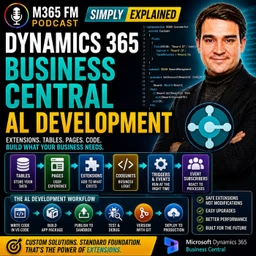
Inside an AL extension, developers work with objects. An object is a named piece of the application responsible for a particular job. The episode introduces several important AL object types: Tables → Store information Pages → Present information to users Table Extensions → Add information to existing tables Page Extensions → Add functionality to existing pages Codeunits → Contain reusable business logic Reports → Present information in documents or layouts Queries → Retrieve focused information XMLports → Exchange structured information
TABLES
Tables store information in Business Central. Think of a table as a digital filing cabinet. A customer table contains customer records. An item table contains products. Sales-related tables contain information associated with sales transactions. If an organization needs information that doesn't belong in an existing standard table, an extension can create its own table. Examples from the episode include reward levels, equipment inspections, and project approvals.
FIELDS
Fields are the individual pieces of information stored inside records. A customer can have a name, address, payment term, telephone number, and other details. Custom fields could contain information such as a reward ID, delivery instruction, internal risk score, membership level, or link to another system. Fields can contain different types of information including text, dates, amounts, yes/no values, and predefined choices.
PAGES
Pages are the screens users interact with inside Business Central. A customer card is a page. A list of sales orders is another page. Different page types support different activities. A Card Page focuses on one record. A List Page displays multiple records. A Worksheet Page supports scenarios where employees need to enter or process several lines of information together. Tables store the information while pages determine how employees interact with it.
TABLE EXTENSIONS
Suppose Business Central's standard customer table already contains almost everything the organization requires, but the business needs one additional Reward ID. Creating another customer table would unnecessarily duplicate the existing customer information. Instead, a developer creates a Table Extension. The standard customer table remains intact while the extension adds the additional company-specific field.
PAGE EXTENSIONS
Adding a field to the underlying table doesn't automatically display it to employees. A Page Extension adds the field to an existing Business Central page. The Reward ID could therefore appear directly on the standard Customer Card. Page Extensions can also add groups, actions, buttons, or menu commands. Employees continue working on the familiar Business Central page while the extension adds the functionality required by the organization.
CODEUNITS
Codeunits provide a home for business logic. Suppose the selected customer reward level determines the discount percentage. Instead of putting the discount calculation directly into the Customer Card page, the calculation can live inside a Codeunit. Other pages, reports, and business processes can then call the same procedure. This avoids maintaining several different versions of the same business rule. ㅤ TRIGGERS ㅤ A trigger is a defined location inside an AL object where code can execute when something happens. For example, code can run when a field value changes or when a page opens or closes. Suppose somebody selects a Reward ID for a customer. A validation trigger could check whether the reward level exists, whether the customer is blocked, or whether another value should be updated. The rule executes when the relevant action occurs.
EVENTS
Events allow extensions to react to processes occurring inside Business Central without copying those complete processes. Think of an event as a notification from the standard application. Business Central might announce that a record is about to be inserted, a document is about to be posted, or another process has completed. An extension can listen for the event and execute its own functionality at the appropriate point.tes
Become a supporter of this podcast: https://www.spreaker.com/podcast/m365-fm-modern-work-security-and-productivity-with-microsoft-365--6704921/support.
WHAT IS BUSINESS CENTRAL AL DEVELOPMENT?
AL stands for Application Language. It is Microsoft's programming language for developing functionality specifically for Dynamics 365 Business Central. AL allows developers to add and change business functionality involving records, pages, reports, calculations, validations, and processes. The important concept isn't only AL itself. It's the extension model. Instead of rewriting Microsoft's standard Business Central application, developers create separate extensions containing their custom functionality.
WHY BUSINESSES CUSTOMIZE BUSINESS CENTRAL
Business Central already covers many standard business processes. But no two organizations operate exactly the same way. A food distributor might require additional batch information. A service business could require another approval before invoicing. A retailer might need customer reward levels. Another organization could require specific fields, forms, or internal validation rules. These requirements don't necessarily justify changing an entire ERP process. Sometimes the business simply needs Business Central to understand one additional piece of information or enforce one additional rule.
WHY EXTENSIONS EXIST
Older development approaches frequently involved modifying the original application code. That could work until the underlying application was updated. Microsoft's new code and the organization's modifications then had to be compared and reconciled. Business Central extensions use a different model. The standard application remains in place while custom functionality sits beside it as a separate application. Updates still require testing, but developers don't need to recreate every customization inside Microsoft's original source code.
THINK OF BUSINESS CENTRAL AS AN OFFICE BUILDING
The episode uses an office-building analogy. Business Central is the building. Instead of knocking holes through the existing structure whenever somebody needs another room, the platform provides approved connection points for extending it. Microsoft maintains the main building. The organization maintains its additional functionality. This separation makes the resulting environment easier to understand and maintain over time.
STANDARD FIRST, CUSTOMIZE SECOND
Not everything should be customized. Changing Business Central simply because its standard process looks different from an organization's previous ERP can create unnecessary maintenance. Good customization begins with three questions: What problem are employees experiencing? What should happen instead? Can standard Business Central already solve it? AL development becomes relevant when the standard product genuinely doesn't meet the business requirement.
WHAT CAN AL DO?
AL can work with Business Central data and application behavior. Developers can use it to add or change records, calculate values, control pages, create reports, validate information, display messages, and automate business rules. But AL isn't intended as a general-purpose language for building every kind of software. You wouldn't normally choose AL for a public shopping website, mobile game, or standalone desktop application. Its focused job is extending Dynamics 365 Business Central.
WHAT IS A BUSINESS CENTRAL EXTENSION?
An extension is a separate application Business Central can install. It contains the organization's custom functionality while Microsoft's standard Business Central application remains separate. An extension can be extremely small. It might add one additional field to the customer record. Another extension could contain an entire industry-specific solution with its own data, processes, pages, reports, and business rules. Both follow the same fundamental extension architecture.
AL VS THE OLDER C/AL MODEL
The episode also discusses C/AL, associated with older Dynamics NAV development. In that development model, developers frequently modified original application objects directly. Many organizations successfully operated systems this way, but customizations became closely tied to the standard application. AL moved Business Central toward an app-based extension model, separating custom functionality from Microsoft's standard application.
MULTIPLE EXTENSIONS
Business Central can contain more than one extension. An organization might have an extension from a software partner handling payroll, another extension providing shipping functionality, and an internally developed extension implementing company-specific rules. Business Central brings those applications together as long as they follow the platform's rules and don't conflict. This modular approach allows organizations to assemble the functionality their particular business requires.
THE MAIN AL BUILDING BLOCKS
Inside an AL extension, developers work with objects. An object is a named piece of the application responsible for a particular job. The episode introduces several important AL object types: Tables → Store information Pages → Present information to users Table Extensions → Add information to existing tables Page Extensions → Add functionality to existing pages Codeunits → Contain reusable business logic Reports → Present information in documents or layouts Queries → Retrieve focused information XMLports → Exchange structured information
TABLES
Tables store information in Business Central. Think of a table as a digital filing cabinet. A customer table contains customer records. An item table contains products. Sales-related tables contain information associated with sales transactions. If an organization needs information that doesn't belong in an existing standard table, an extension can create its own table. Examples from the episode include reward levels, equipment inspections, and project approvals.
FIELDS
Fields are the individual pieces of information stored inside records. A customer can have a name, address, payment term, telephone number, and other details. Custom fields could contain information such as a reward ID, delivery instruction, internal risk score, membership level, or link to another system. Fields can contain different types of information including text, dates, amounts, yes/no values, and predefined choices.
PAGES
Pages are the screens users interact with inside Business Central. A customer card is a page. A list of sales orders is another page. Different page types support different activities. A Card Page focuses on one record. A List Page displays multiple records. A Worksheet Page supports scenarios where employees need to enter or process several lines of information together. Tables store the information while pages determine how employees interact with it.
TABLE EXTENSIONS
Suppose Business Central's standard customer table already contains almost everything the organization requires, but the business needs one additional Reward ID. Creating another customer table would unnecessarily duplicate the existing customer information. Instead, a developer creates a Table Extension. The standard customer table remains intact while the extension adds the additional company-specific field.
PAGE EXTENSIONS
Adding a field to the underlying table doesn't automatically display it to employees. A Page Extension adds the field to an existing Business Central page. The Reward ID could therefore appear directly on the standard Customer Card. Page Extensions can also add groups, actions, buttons, or menu commands. Employees continue working on the familiar Business Central page while the extension adds the functionality required by the organization.
CODEUNITS
Codeunits provide a home for business logic. Suppose the selected customer reward level determines the discount percentage. Instead of putting the discount calculation directly into the Customer Card page, the calculation can live inside a Codeunit. Other pages, reports, and business processes can then call the same procedure. This avoids maintaining several different versions of the same business rule. ㅤ TRIGGERS ㅤ A trigger is a defined location inside an AL object where code can execute when something happens. For example, code can run when a field value changes or when a page opens or closes. Suppose somebody selects a Reward ID for a customer. A validation trigger could check whether the reward level exists, whether the customer is blocked, or whether another value should be updated. The rule executes when the relevant action occurs.
EVENTS
Events allow extensions to react to processes occurring inside Business Central without copying those complete processes. Think of an event as a notification from the standard application. Business Central might announce that a record is about to be inserted, a document is about to be posted, or another process has completed. An extension can listen for the event and execute its own functionality at the appropriate point.tes
Become a supporter of this podcast: https://www.spreaker.com/podcast/m365-fm-modern-work-security-and-productivity-with-microsoft-365--6704921/support.